The weather

lunes, 8 de abril de 2019

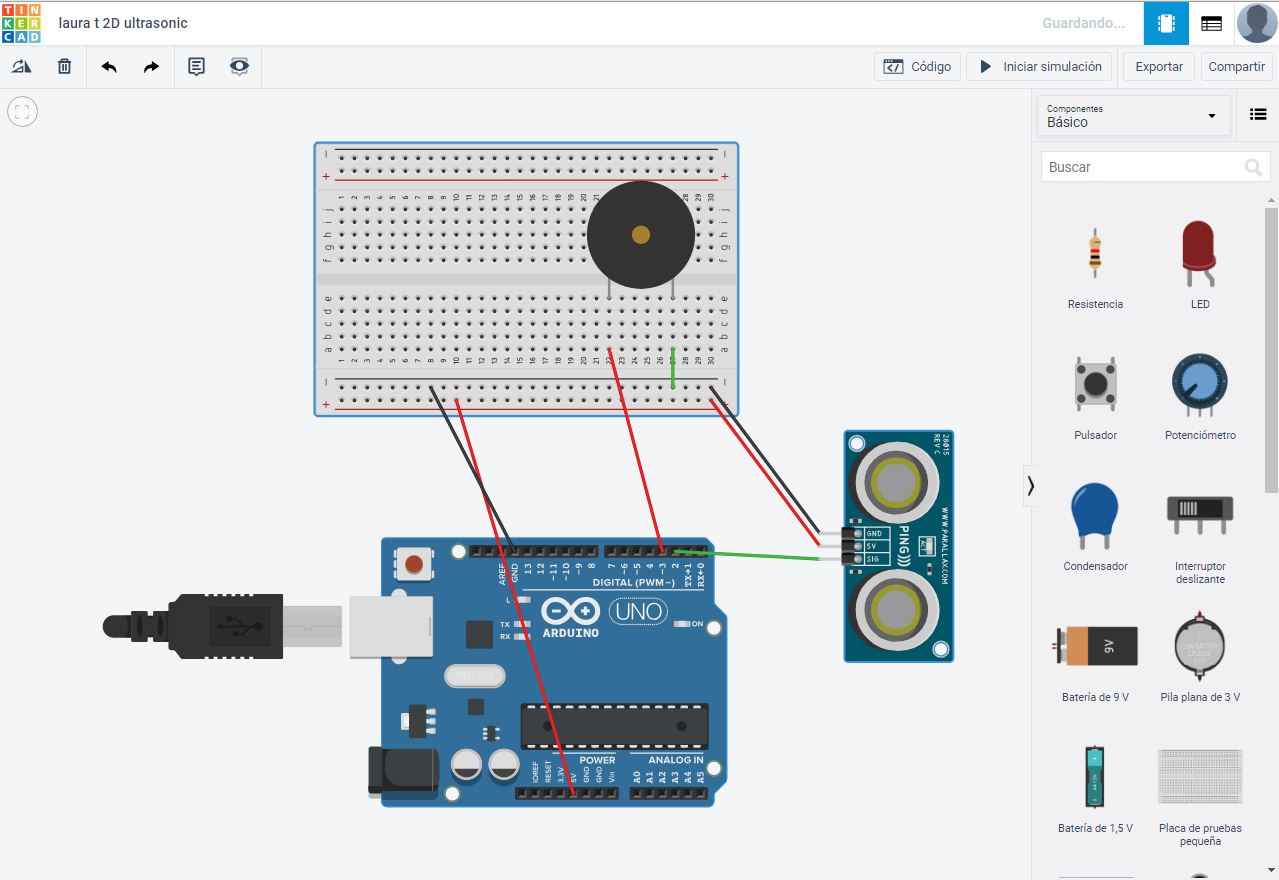
Ultrasonic distance sensor with different distances

Good morning friends!!

Today we present to you an electronic project consisting of an alarm that is activated when it detects an object less than 40 centimetres away.

The elements are:
  • Arduino.
  • Protoboard
  • Cables
  • Ultrasonic sensor
  • Speaker
The operation is as follows:

When the sensor detects an object less than 40 cm away, it sends a HIGH signal to pin 2 of the Arduino, which we have programmed to send in that case a HIGH signal, through pin 3 that activates the speaker in order to sound the alarm.


This way the parking sensors work, also a Lunar Rover, could use it not to collide with rocks.


Click here to see the design


lunes, 1 de abril de 2019

App animals and sounds

Good morning,

Today we present you a design of an app. It has buttons with photos of animals and vehicles. When you press the photos the sounds are emitted.

The animals have been downloaded from google images, eye of the initial grid, so that they are small, selecting the image with the right button and save image as.

In App inventor we have to put buttons, deleting the text and putting of image of the button the photos of the animals.

Then in average, we drag the 8 sounds, assigning to each sound a sound, by means of the command source.

You can see the designs and the blocks below:


lunes, 18 de marzo de 2019

Father's Day key ring

Hi everyone!!

Today I present to you the development of a 3D key ring that I have modified for Father's Day.
You can use whatever you father likes.

On the back we have attached a parallelepiped, we have also written letters in relief, a heart and to finish a hoop.

Click here to see the design


Here you can see some pictures of it:


viernes, 15 de marzo de 2019

Embed code for a Scratch game to our website or blog

Hi:

Today I have embeed the football game I made with scratch in my blog and in my webpage.


The Html code is the following (you have to change the number of digits that appears in the web address, by the code of your game also te number of the width and height in order to fit in the space you want):


<link rel="stylesheet" href="style.css" />


    <iframe allowtransparency="true" width="250" height="250" src="//scratch.mit.edu/projects/embed/289214413/?autostart=false" frameborder="0" allowfullscreen></iframe>


lunes, 11 de marzo de 2019

Development of penalty shooters game with Scratch

Good morning.

Today we have designed a game with Scratch to throw penalties, it is multiplayer, (thrower with keyboard, goalkeeper with mouse) and although the blocks of the goalkeeper and the football boot are easy those of the ball can become more complicated.

We hope you like it.


Note: The scenario and gloves are drawn using the brush tools of the objects and scenarios.


These are the blocks for the ball:


The blocks for the boot are: 


The blocks for the gloves are:


lunes, 18 de febrero de 2019

Control of a servomotor with a potentiometer (variable resistance by turning it).

Good morning,

Today we show you how to control a servo motor from left to right by turning a potentiometer (variable resistance), left or right.

The signal from the potentiometer reaches the Arduino via input A0 (input pin A0).

The Arduino is programmed to rotate the servo by sending the signal through the output (output 0).

Here we have the base to control a turn of a steering wheel... For example of a lunar vehicle!

Click to see the circuit


Final project

Hi! Today I show you my last project. I have developed it with scratch. In this year, we have learnt: Development of Applications for m...